
E-Signature Is Here: Clear Estimates Is Changing How Contractors Close Jobs
The most-requested feature in Clear Estimates' history is now live - and it's available on every plan, including during your free trial.
The Problem Every Contractor Knows
You finish the estimate. You put in the hours. You build a detailed, professional proposal - and then you email a PDF and wait.
You wait for a reply. You follow up. You wonder if they even opened it. You ask your client to print it, sign it, scan it, and send it back. Or you pay for a separate e-signature tool, export the PDF, upload it, and manage yet another subscription just to get a name on a dotted line.
For years, this was the reality for residential remodelers and contractors. The estimating part was solved. The proposal delivery and signing part was still a headache or required a different tool.
That changes now.
Our Most Requested Feature - Finally Here
Contractors have been asking for built in e-signature - in our feedback boards, in support tickets and in conversations with our team. We've seen requests from thousands of users who wanted one thing: a way to get their proposals signed without leaving the tool they already use to build them.
We're proud to say: it's live.
With built-in e-signature, Clear Estimates contractors can now go from a completed estimate to a signed, legally binding proposal without exporting a single file, opening a second app, or chasing down an ink signature. The entire workflow - from scope to signature - lives in one place.
What It Looks Like in Practice
Here's the full flow from start to finish:
1. Build Your Estimate in Clear Estimates
Use CE's locally-sourced cost database - updated quarterly, backed by 20+ years of real contractor project data - to build an accurate, itemized estimate. Use our dedicated AI to describe your project and generate a detailed cost breakdown in minutes, or build it directly from the part library.
2. Submit the Proposal With One Click
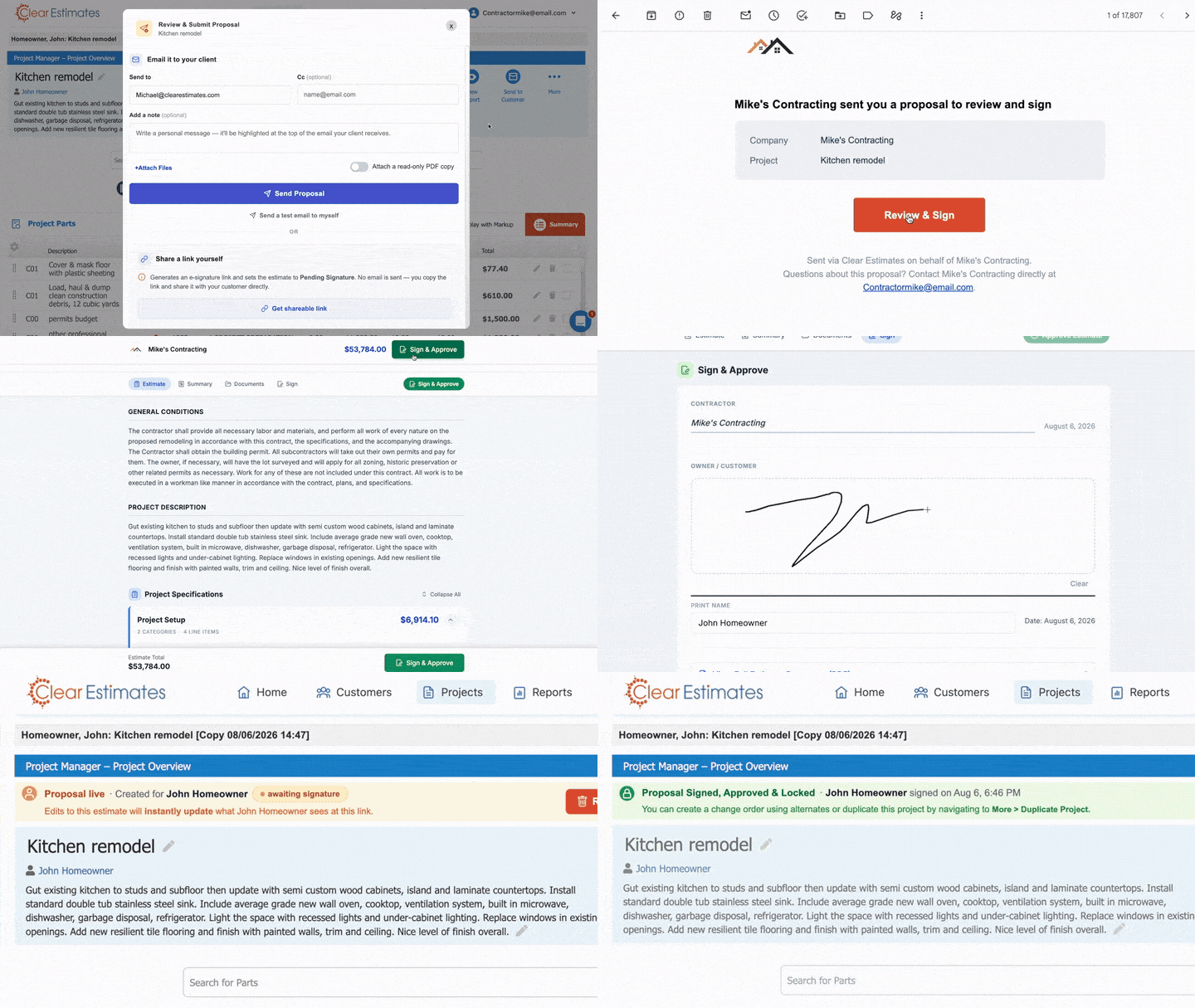
When your estimate is ready, click Send to Customer → Submit Proposal from your Projects page. A review window opens where you can:
- Preview exactly what your client will see before sending
- Attach files (contracts, specs, addendums)
- Choose delivery method: send via CE email, copy the shareable link, or download the PDF
Before submitting, take a moment to preview the client-facing proposal yourself. What you see is what they get - a clean, professional document with your scope, pricing, and terms.
3. Client Gets a Signable Link
Your client receives the proposal by email - sent from your own email address, with replies going directly to you. They click the Review & Sign link and see the full proposal on any device: phone, tablet, or desktop. No app download. No account required. They review the scope, ask questions if needed, and sign with a tap.
4. You're Notified Instantly
The moment your client signs, you receive a notification and a status update inside your project. The signed PDF is saved automatically.
5. The Project is Signed, Change Orders Take Over
Once signed, your estimate locks. Scope and price are protected exactly as agreed. If anything changes mid-job - an upgrade, an addition, a swap - you submit it as a signable change order through the same flow. Your client gets a link to review and sign it, just like the original proposal. Every change is documented and approved:
What Makes This Different From DocuSign
The obvious question: why not just use DocuSign?
The short answer: because your estimate is already in Clear Estimates.
With a standalone e-signature tool, the workflow looks like this: build estimate in CE → export PDF → import to DocuSign → set up signing fields → send → wait → receive signed copy → file it somewhere separate. Every step is a handoff between tools.
With CE's built-in e-signature, the workflow is simple. Build estimate → submit proposal → client signs. That's it. The signed PDF is stored in your project automatically. The history lives within the estimate. There's nothing to sync, nothing to export, nothing to manage.
And unlike a generic e-signature tool, Clear Estimates proposals are tied directly to the underlying estimate data - which means live updates, proposal status tracking, and signable change orders all work natively within the same project.
Signable Change Orders: Protecting the Whole Job
One of the most valuable - and most overlooked - aspects of e-signature isn't the initial proposal. It's what happens after.
Scope changes mid-job are one of the biggest sources of contractor-client disputes. A client asks for an upgrade. You add it. Weeks later, there's a disagreement about what was agreed to and what it cost. Without a signed change order, you're arguing from memory.
With CE's built-in change orders, every scope change after signing goes through the same process as the original proposal:
- Create an alternate or change order in the project
- Submit it for signature
- Client gets a link to review and sign
- It locks automatically once signed
You can even credit back parts from the original estimate when swapping materials or fixtures - so your client only pays the difference, not the full new scope on top of what was already signed.
Every change is documented. Every approval is in writing. Every version is stored in the same project.
Available on Every Plan - Unlimited Use During Trial
E-signature isn't a premium add-on. It's available on all Clear Estimates plans, including during your free trial. If you're already a subscriber, it's in your account right now. If you've never tried Clear Estimates, you can use e-signature from day one of your free 30 day trial.
There's no separate subscription. No per-signature fees. No third-party integrations required.
The Complete Contractor Workflow - In One Tool
Clear Estimates has always been the tool contractors use to build accurate, professional estimates. With e-signature, it's now the tool you use to close the job.
From the first scope note to the signed contract - and through every change order after - the entire workflow lives in one place.
Site visit. Estimate. Proposal. Signature. Change orders. Done.
How to Get Started
If you're an existing Clear Estimates user: log into your account, open any project, and click Send to Customer → Submit Proposal. The feature is live and ready.
If you're new to Clear Estimates: start your free 30 day trial - no credit card required, and e-signature is included from day one.
Questions? Our support team is available at support@clearestimates.com and our full how-to guide is available in our help center.
